ads by google

Showing posts with label Apple. Show all posts

Sunday, 22 July 2012

MacBook Pro a pricey superstar - review

MacBook Pro a pricey superstar - review

News MacBook Pro a pricey superstar - review


Cape Town – The Apple MacBook Pro is easily one of the best looking computers you can buy, but ensure that you are prepared to scale the dizzy heights of its price.

Apple has taken great care in producing this machine: The brushed metal finish is classy and it feels somehow familiar even if you've never used an Apple product before.

Indeed, one could argue that Apple products are stars in their own right if one counts that they have been featured in TV shows like Big Bang Theory and House, as well as about eight minutes of screen time in Mission Impossible: Ghost Protocol.

So how hard is it to make the transition from Windows to Mac? Surprisingly easy. The interface is slick and all your programs are stored in a "dock" where Windows users would normally find the "taskbar" (Of course, that disappears in Windows 8, due out in October).

Even for diehard PC fans, there are your familiar programs like Microsoft Word, PowerPoint and Excel so it means that the MacBook can function like an ordinary office computer albeit with more style.

Retina Display

Make no mistake tough, this is no Windows clone and while some elements are familiar, Apple leads the field in ecosystem development.

Those familiar with the iPad will instantly recognise the App Store where you are able to purchase applications online for the Mac OS X Lion operating system.

Apple has made a big deal of the Retina Display on the MacBook and while the 40cm screen is excellent, you are still required to take decent pictures to take full advantage of the display.

The Trackpad takes some getting used to as it supports a plethora of gestures that increase productivity on the MacBook and there are the expected hardware touches in a machine that costs as much as a used car.

The keyboard illuminates in low light and the machine instantly starts iPhoto when a camera memory card is inserted into the built-in reader.

Apple has paid attention to details and even the charger and screen lid are magnetised and the microphone is hidden beneath the left speaker bay; the built-in high-definition webcam uses a screen flash to light the subject.

As the name implies, the MacBook Pro is for professionals and designers have long praised the speed and functionality of the Apple computers.

Inconveniences

The i7 quad core processor and 8GB RAM together make this Mac fast and even the power user has a smooth experience with no graphic delays, even with a multitude of applications running.

For us regular folk, though, the device has more than enough processing power for image and video editing, content consumption and general tasks.

There are some inconveniences that hurt the experience: The lack of a network cable slot is disappointing and while one can buy an adaptor, one feels that it could have been included because it was present on the previous generation.

The lack of an optical drive is not a big deal because it saves battery power and weight. There is a 250GB solid state drive (SSD) that that contributes to the speed and power savings.

The battery lasts well over five hours, even with continued operation and the MacBook remains silent during heavy use.

Not too long ago, Windows computers couldn't compete with the style nor the price of the MacBook, but that's changing with devices like the Samsung Series 9 and the Acer Aspire ultrabook.

You also get a fast processor, SSD, fancy touch pad and hot keys, but at a slightly lower price.

The MacBookPro though, is a movie star and as such commands the bragging rights of a recommended retail price of R29 999

SSD Optical Drive Replacement Speeds a Sluggish MacBook Pro

News About Macbook Pro
 
"SSD Optical Drive Replacement Speeds a Sluggish MacBook Pro"


SSD Optical Drive Replacement Speeds a Sluggish MacBook Pro

I blame the Retina MacBook Pro. Apple sent a unit for me to review for my Seattle Times column, and I was impressed (see “Retina MacBook Pro: a treat for the eyes, maybe not for the wallet”). Yes, the high-resolution screen is beautiful, but coming from the experience of using a mid-2010 MacBook Pro, I think the machine’s overall speed made more of an impact on me.
As tempting as the new machine is, however, I’m not yet ready to replace my current laptop. I usually refresh my computer every three years or so, which has historically worked in my favor (see “More Bang, Less Bucks for My MacBook Pro,” 20 November 2006). But experiencing what’s possible and then returning to what’s normal was especially difficult when I had to send the Retina MacBook Pro back to Apple.
The Retina MacBook Pro accomplishes its swiftness by using a fast CPU and graphics processor, but also by replacing a traditional hard drive with flash storage. Unlike a hard drive, flash storage has no spinning storage platters and read/write armature skipping about to access data from physical locations on the discs, making data access much faster.
To conserve physical space, the flash storage in the Retina MacBook Pro is made up of strips of memory, much like RAM. For most other computers, the way to get flash storage is to install a solid-state drive (SSD), which puts the memory chips into an enclosure that fits into a hard drive bay.
SSDs are not new, but until now replacing my laptop’s hard drive with an SSD hasn’t been practical. SSDs have been almost exactly the opposite of hard drives in key respects: prices of hard drives have remained low as capacities have risen, while SSDs have been expensive and have offered far less capacity than their spinning counterparts. Fortunately, that curve is flattening out, and so I decided I was ready for a speed boost.

The Capacity Conundrum, Part I -- First, I had to resolve the question of just how much capacity I really need. I’ve grown comfortable having a 500 GB drive — too comfortable, in fact, as I regularly bump up against the limit. A lot of that storage is cruft like old video files from my years of writing about iMovie and old applications and data I’ve never properly cleaned out because it has always been easier to move to a larger hard disk.
Replacing the drive with an SSD of similar size was still too expensive for me, landing in the $600-$700 range. Could I pare the contents of my drive to fit within 256 GB? Possible, but recommendations from a few friends on Twitter presented another option. I could keep my 500 GB hard drive for data storage and replace the MacBook Pro’s optical drive with an SSD which I’d use as the boot drive. The optical drive isn’t important to me — I rarely use CDs or DVDs, and I have an older Mac mini that can fulfill that role. If I find myself regularly needing the drive while out of the house, I could also put the optical drive into a $39.99 OWC SuperSlim enclosure, turning it into an external USB device.
(Swapping the optical drive for an SSD works only for recent MacBook Pros that treat the optical drive as just another Serial ATA device, like a hard disk. I couldn’t avail myself of this approach with my older 2006 MacBook Pro, for example.)
With that decided, I ordered a caddy to replace the optical drive (the $15 Hard Drive Caddy Tray for Apple Unibody MacBook / MacBook Pro 13 15 17 SuperDrive) and set off to find an SSD to install in it.

Choosing an SSD -- Start digging into options for SSDs and you might decide to stick with that old hard drive after all. Like shopping for HDTVs, specs and marketing claims compete for your attention, leading to (in my case) a nearly vapor-locked brain. However, it turns out that a lot of the considerations you need to make are out of your control, as I’ll explain in a moment.
All resellers will tout the incredible performance gains compared to a standard 5400 rpm hard drive. These are usually expressed in terms of peak read and write speeds, such as “500 MB per second,” and the number of input/output operations per second (IOPS). So, in general, higher numbers are better in those respects.
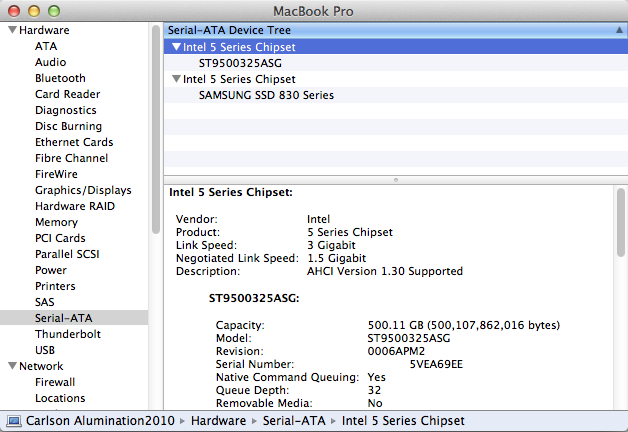
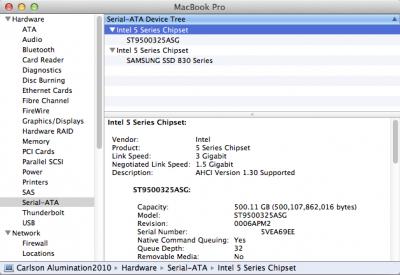
But those capabilities — which are invariably maximum performance figures, not average results — depend on whether your Mac can push that amount of data through the bus that connects to the drive. You can find this in the System Information utility: click the Apple menu, press the Option key, and choose System Information (under Mac OS X 10.6 Snow Leopard and earlier, it’s called System Profiler). Select Serial-ATA in the Contents column at left, click one of the headings in the top pane, and look at the Link Speed item in the details that appear.
On my machine, there are two SATA ports, both using Intel 5 Series chipsets, with link speeds of 3 gigabits per second (Gbps). (In the figure, the first port is in use by the 500 GB drive, and the second one is now in use by the SSD, but was previously used by the optical drive.)
When browsing the specs for SSDs online, look for the device’s SATA interface, which lists either SATA II (or SATA 2, or SATA revision 2) at 3 Gbps, or SATA III (or SATA 3 or SATA revision 3) at 6 Gbps. If your Mac supports link speeds of only 1.5 Gbps or 3 Gbps, it won’t be able to take full advantage of an SSD with a data throughput of 6 Gbps.
In theory, you wouldn’t want to buy an SSD that offers more throughput than your Mac can handle. That would be like purchasing a Ferrari but never driving it faster than 30 miles per hour. In my case, I wouldn’t need a 6 Gbps SATA III device because my MacBook Pro supports only up to 3 Gbps, or SATA II, speeds. Common sense would suggest that I would be able to buy a SATA II drive for less cost.
But as of this writing, there’s very little price difference between SATA II and SATA III SSDs, eliminating that variable from the equation. In the 256 GB range that I was researching, prices hovered around $250. I did find a few SATA III models that were cheaper, but was scared away by reports of necessary firmware updates or glitches encountered when installed in Macs.
I finally ended up choosing a $250 Samsung 830 SSD (specifically, the Samsung 830 — Series MZ-7PC256N/AM 256 GB 2.5 Inch SATA III MLC Internal SSD Laptop Kit with Norton Ghost 15; Norton Ghost is a Windows backup utility, so obviously I wouldn’t need it, but the software may come in handy for my Boot Camp partition running Windows). The price was right, even though my Mac can’t take full advantage of the 6 Gbps rate, and it uses the same technology as Apple employs for the Retina MacBook Pro. (Anandtech’s Anand Lal Shimpi takes a close look at the laptop’s flash memory performance in “The next-gen MacBook Pro with Retina Display: SSD Analysis.”) Even if my Mac won’t see the full performance the SSD is capable of, I may end up using it in a future Mac that can take advantage of the 6 Gbps throughput.

Installation -- The difficulty of opening your Mac to install the SSD depends on your experience level and the machine you own. Getting into my MacBook Pro wasn’t difficult, thanks to the step-by-step guide I found at iFixit. Make sure you review the steps before you start, to ensure that you have the proper tools at hand and that you’re not getting in over your head. Apple has started using a variety of screw heads in its machines — in addition to a tiny Phillips-head screwdriver, I realized I needed (and was surprised to discover that I own) a Tri-wing Y1 screwdriver.
And, of course, I made a backup of my data. In this case, you wouldn’t think a backup would be important, since the 500 GB drive wasn’t being replaced. However, I’m paranoid about my data, and you should be, too. If I were to accidentally snap a cable or discharge static into the motherboard, that extra backup might become extremely welcome.
After carefully removing the optical drive and replacing it with the SSD in its drive caddy, I reassembled the MacBook Pro and powered it on. As with any new unformatted volume, Mac OS X asked if I’d like to initialize the drive, and clicking Initialize opened Disk Utility. I selected the drive in the sidebar, clicked the Partition heading, clicked the Options button, and set the Partition Map Scheme to GUID Partition Table to format the drive properly.
Lastly, I installed a fresh version of 10.7 Lion from the internal hard disk. (When you purchase Mac OS X from the Mac App Store, the installer application is stored in your Applications folder. However, it’s erased once you finish the installation (if you’re installing on the same drive), which is a pain. Therefore, I make a point of copying the installer elsewhere so I have it in times like this, rather than having to re-download the entire file.)
During the Mac OS X installation process, you’re asked if you want to migrate data from a backup or another drive. At first, I chose to skip that step and start completely new — and really, I was impatient to see just how much of an improvement the SSD made.
However, this introduced a snag: During setup, you need to create a user name and password. The problem is, when I ran Migration Assistant later, it didn’t like that I had used the same name and password from the 500 GB drive (because I didn’t want to abandon everything I’d set up in my normal operating environment).
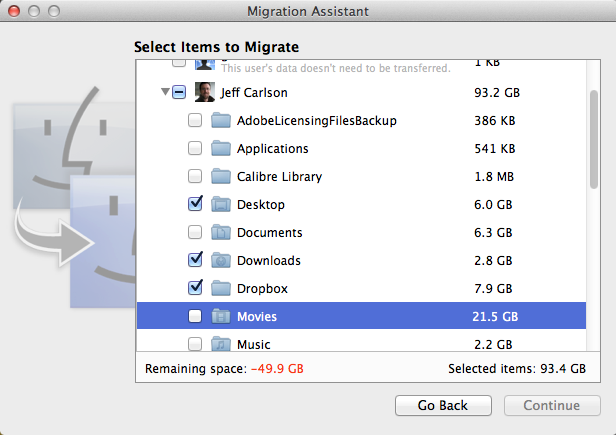
So, I reinstalled Mac OS X — which takes much less time on the SSD! — and ran the migration step from within the installation process. To get my data to fit onto the SSD, I omitted several large folders available through the Migration Assistant, such as Movies and Pictures in my Home directory. (The following screenshot was taken using the standalone Migration Assistant utility, since I didn’t grab a screenshot during the installation.)
Copying more than 200 GB of data, even to an SSD, takes quite some time, so I left the MacBook Pro running overnight. The next morning, I woke up to my own environment, with my original username, password, desktop wallpapers, and other settings, but in a significantly faster Mac.

A New Machine -- How fast? Restarting my MacBook Pro typically took anywhere between 5 and 15 minutes, with Lion’s Resume feature enabled so that any applications that were running at restart came back to the same state. The same action now takes less than 2 minutes. I want to keep restarting just to enjoy that change.
Launching applications now happens in a few seconds, even startup hogs like Adobe InDesign CS5 (2:20 on the hard disk, 0:19 on the SSD). In fact, I swear even my mouse pointer moves faster than it used to, although I’m probably imagining that.
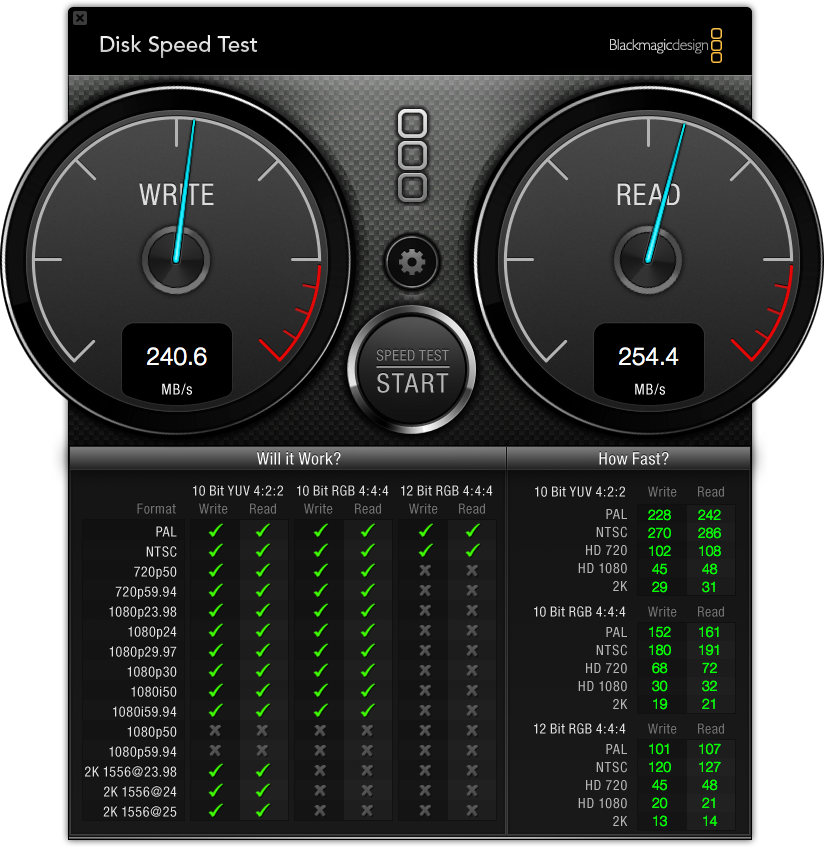
In terms of data performance, I ran tests using Black Magic Design’s free Disk Speed Test. My 500 GB hard disk managed about 70 MBps (megabytes per second) for both read and write operations.
The SSD averaged about 240 MBps for write operations and 255 MBps for read operations. That’s a great improvement, although throttled somewhat because my MacBook Pro can handle only 3 Gbps throughput instead of the 6 Gbps the SSD is capable of pushing.

Believe me, I’m not complaining. I’m sure I’ll grow accustomed to the new speed, but for now it really does feel like I have a new computer.

The Capacity Conundrum, Part II -- Next began the work of turning my 500 GB drive into a storage disk instead of a slightly outdated mirror of the SSD. Since I kept most of the high-capacity items like music, movies, and photos on the drive, I needed to make them properly visible to Mac OS X running on the SSD.
I started with iTunes. I’ve switched to using iTunes Match, so my entire music library is no longer occupying vast amounts of space on my MacBook Pro. However, I do keep many albums on the drive to avoid always streaming music from iCloud. (Perhaps I should just give up on that idea and stream everything, since I’m mostly connected to Wi-Fi when I work on my laptop.)
I assumed that pointing iTunes’s preferences to the correct folder containing them would do the trick. Nope, because that just specifies where files end up when imported. Instead, the solution is twofold: I copied my iTunes folder from ~/Music/ on the hard drive (which contains just the iTunes library file and associated data such as album cover artwork, not the music files themselves) to ~/Music/ on the SSD, and launched iTunes with the Option key held down. I then clicked Choose Library to point to that library file. When iTunes finished starting up, everything was exactly as I left it.
The same advice applies to iPhoto: I simply held down the Option key at launch and pointed at my iPhoto Library file on the 500 GB drive.
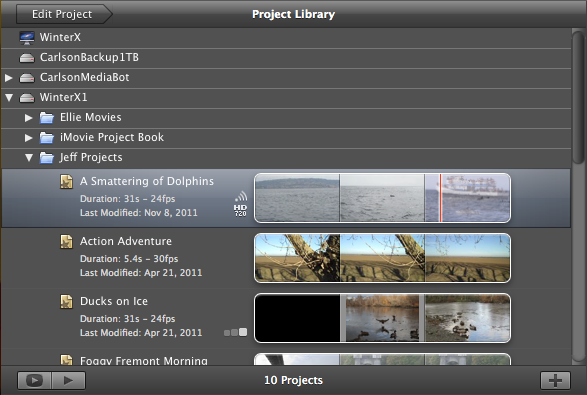
iMovie turned out to be a special case. The application looks for its data in two folders within the ~/Movies/ folder: iMovie Events and iMovie Projects. However, when events and projects are stored on a drive other than the startup drive, those two folders must live at the root level. So, I moved iMovie Events and iMovie Projects there. When you launch iMovie, it scans any connected drives and lists the projects and events in the appropriate panes.

Fortunately, moving the projects and events together in this fashion doesn’t break any links or orphan any video clips. Normally, if you’re moving iMovie projects or events to other drives you want to do it within iMovie itself (make sure View > Group Events by Disk is enabled and drag items between volumes in the Project browser or Event browser).

Cleaning Up -- I’m not done with my new housekeeping yet, but those were the steps that got my machine into basic working order. My next step is to wipe the 500 GB drive, since I don’t need a full Mac OS X installation on that disk, with its hierarchy of user folders. To do that, I’ll make a backup, erase the drive using Disk Utility, and copy my media files back to it. Then, to wrap up, I’ll point iTunes and iPhoto at the new library locations.
But for now I’m not in a hurry to get that done. I need to go restart my MacBook Pro a few times and launch some apps, and marvel at how much more responsive my machine has become.


Sunday, 22 April 2012

Apple iPod Classic 160GB Specification

Apple iPod Classic 160GB Specifications - News information about latest gadgets. Apple iPod Classic is an iPod with 160GB of memory to make customers be satisfied. And please read the article directly on the Apple iPod Classic 160GB Specifications Price Photos below.

Spesification Apple iPod Classic 160GB
FeaturesMeet a musical Genius
Watch movies and TV shows
Click to enjoy
Play iPod games
Hold everything
Share your photos
Audio Playback* Frequency response: 20Hz to 20,000Hz
* Audio formats supported: AAC (8 to 320 Kbps), Protected AAC (from iTunes Store), HE-AAC, MP3 (8 to 320 Kbps), MP3 VBR, Audible (formats 2, 3, 4, Audible Enhanced Audio, AAX, and AAX+), Apple Lossless, AIFF, and WAV
* User-configurable maximum volume limit
Video PlaybackH.264 video, up to 1.5 Mbps, 640 by 480 pixels, 30 frames per second, Low-Complexity version of the H.264 Baseline Profile with AAC-LC audio up to 160 Kbps, 48kHz, stereo audio in .m4v, .mp4, and .mov file formats: H.264 video, up to 2.5 Mbps, 640 by 480 pixels, 30 frames per second, Baseline Profile up to Level 3.0 with AAC-LC audio up to 160 Kbps, 48kHz, stereo audio in .m4v, .mp4, and .mov file formats: MPEG-4 video, up to 2.5 Mbps, 640 by 480 pixels, 30 frames per second, Simple Profile with AAC-LC audio up to 160 Kbps, 48kHz, stereo audio in .m4v, .mp4, and .mov file formats
Display2.5″ (diagonal) color LCD with LED backlight
320-by-240-pixel resolution at 163 pixels per inch
Storage160 GB hard drive
Input3.5-mm stereo headphone jack
OutputDock connector
PC ConnectivityMac computer with USB 2.0 port
PC CompatibilityMac OS X v10.4.11 or later
iTunes 9 or later
BatteryBuilt-in rechargeable lithium-ion battery
Battery LifeMusic playback time: Up to 36 hours when fully charged
Video playback time: Up to 6 hours when fully charged
Dimension (WHD)61.8 x 103.5 x 10.5 mm
Weight140 g
Package ContentsiPod classic
Earphones
Dock Connector to USB Cable
Quick Start guide
Warranty1-year Limited Warranty

Saturday, 21 April 2012

Photo of New iPod Touch with 3G facilities Appears on Internet

It appears that leaks information about a product that will be released increasingly occur. This time the 'victim' is Apple. On Wednesday morning, a blog called iDownloadBlog find pictures of the iPod Touch that has 3G facility which inadvertently uploaded by Apple's iTunes site.

Then quickly the image was pulled from the iTunes site and replaced with a new image. But the scenery is only applicable to the iTunes site visitors from North America. English version of the iTunes site without hesitate iPod Touch that displays images.

Leakage of information is increasingly confirming previous rumors that say that the iPod Touch will have a 3G facility and will be released in September. Actually, the 3G facilities on the iPod Touch can be known from the IOS 5 beta 4. There are options to check the appropriate option on the cellular and GPS iCloud and the settings menu.

From these findings, it appears that Apple will not merilisi iPhone Nano, they prefer to complete the hardware on the iPod Touch so it can support and iMessage Facetime through 3G wireless networks. True or not this information, we wait until September.

Thursday, 19 April 2012

5 New iPhone Is Already Produced & will be launched in October 2011?

The iPhone maker in China, Foxconn and Pegatron already started to produce the next device Apple, according to a leaked report, with the launch signal is most likely in October.

Macotakara a Japanese website reported that Foxconn, which meets 85 percent of orders, and Pegatron, which take 15 percent of the rest, has
provide iPhone 5 units - but still without IOS 5, because Apple will install it, along with the final packaging prior to shipping.

Macotakara also said the manufacturing schedule for U.S. launch in early October 2011, while Asia should get the following month. In March 2011, reports emerged that the iPhone has five starts production, but production problems delayed the release of the regular season schedule.

Last month, another source indicates the iPhone device 5 is in production, with Apple placing an order unit of as many as 15 million units.

Apple's iPhone has yet to confirm the report officially this 5, but claims the site is in line with rumors Macotakara other. In fact, Deutsche Telekom has started taking pre-orders in anticipation of the release in the fall, while Best Buy is getting ready to launch in October, according to leaked documents.

When Apple released the iPhone 5 in October, five new iPhone will enter a competitive fall, because there is a fine product releases such as Galaxy S2 from Samsung and Motorola Bionic Droid. But until Foxconn or Pegatron confirm that they are producing handsets iPhone 5 officially, all the reports continued to be still a rumor and speculation.

5 The iPhone is rumored to run on both CDMA and GSM networks, so Apple could sell the same version on more operators. It is also expected to offer a larger touch screen, an 8-megapixel camera and features a Qualcomm chip with capabilities that support NFC mobile payment.

Wednesday, 18 April 2012

Top Review Apple iPod Touch 64 GB

We've added all the advanced features of the iPod touch. Just for fun. Share good times with friends FaceTime. Image scenes in high definition. Or play on the highest resolution iPod screen ever. In fact, the iPod touch is so much technology, you can completely forget about the iPod.

FaceTime on iPod touch lets you hang out, catch up, and relax with friends in a whole new way. With one touch, you can see what your friends are - literally. Witness to a farce in action. Or see his friend through the laughter in your country last night's stories - the new iPod touch with the new iPod touch or iPhone 4 via Wi-Fi. And all you need to get started is an Apple ID and email account. You can choose an email account you already have, or if you prefer, create a new one. You will not enjoy the same way.

Retina-screen iPod touch, brings great at all. This is because it is the highest resolution screen iPod ever, four times the number of pixels of the previous iPod models. In fact, there are so many pixels, the human eye can not distinguish the individual photos. What makes the graphics and images incredibly sharp and impressively sharp text. Just like the printed page.

"You should have seen!" Is it a thing of the past. Because the iPod touch, you will always have a great HD camcorder with you. Say you're at a party and you see someone breakdancing. You're ready to capture the moment in all its glory. In high-definition video 720p. You can record video in low light, thanks to the advanced backside illumination sensor. You can even edit and create your own mini-blockbuster right on your iPod touch using the new iMovie app - with Apple-designed themes, titles and transitions. It is available in the App Store for $ 4.99.

Dimensions

All this flash MP3 player with a stylish and easy to use. One of the first things you'll notice a lot of screen sizes, our ranks the second. 3.5-inch display offers space for video and images - as well as display and eat. The developers of the iPod have really tried to make every inch count on the display. This iPod features more pixels per inch than previous models - four times more - and see the difference, if you're gaming or surfing the net. The display also thinks in terms of backlight. Ambient light sensor means that the flash MP3 player that adjusts screen brightness according to lighting conditions in the course.

Even with the big screen this MP3 flash drive is compact together, measuring just 2.3 inches by 4.4 inches. Touch The previous generation was thin, but the new version is even thinner, with a depth of only 0.28 inches.

This flash MP3 player saves a lot of fun too. There are factors that will make the exact count for each user - including the length of the song and the storage space you use for applications and other media - but you can expect to fit about 16 000 songs on the 64GB model.

You can listen to the very long spans of time, too. This device is a battery that can power your music 40 hours when fully charged. It can be a video up to seven hours when fully charged.

The name "Flash MP3 Player" is a euphemism light for most products of this type, and that includes a 64GB iPod touch, especially when you take into account a wide range of audio formats, can be - ACC, ACC Protected, HE -ACC, MP3, MP3VBR, Audible, Apple Lossless, AIFF and WAV. It also handles video files in H.264, Motion JPEG and MPEG.

Summary

This flash MP3 player looks and works like a phone in many ways, so it may be ideal for someone who wants to be able to make calls, take pictures and surf the web without appropriate phone or plan costly service to match. This flash MP3 player is not quite an iPhone because it does not have GPS functionality, a high quality camera or a fast Internet connection. We do wrong. We just wanted a good MP3 player, and we certainly found a 64 GB iPod Touch

Review And Specification 6th Generation Ipod Nano

 Ipod Nano 6th Generation


Review Prices Specifications 6th Generation Ipod Nano - For those of you who need the information review iPad nano 6th generation is here, and also information regarding the ipod nano 6th generation I inform to you.

Not to forget for those of you who want to buy ipod nano 6th generation of this I gave her the price information. Review Rates specifications 6th Generation iPod Nan is much sought after now diinternet, because they want to buy this ipod nano 6th generation.

In its sixth generation of this (not realized, this one product has been entered into the 6th generation), Apple iPod Nano totally change shape. Interface button on the iPod Nano is removed and replaced with Multitouch interface.

Yes, Apple changed the iPod Nano that it becomes a kind of mini version of the iPod Touch. With dimensions 46% smaller and 42% lighter than previous generations, this latest iPod Nano does look different. Other features include clip-on (just like the iPod Shuffle), FM Radio, Nike +, and pedometer. Even Apple claims a battery life of up to 24 hours during playback.

Size and weight

Height: 1.48 inches (37.5 mm)

Width: 1.61 inches (40.9 mm)

Depth: 0.35 inch (8.78 mm)including clip

Weight: 0.74 ounce (21.1 grams)1

Volume: 0.614 cu inch (10,056 cu mm)including clip

Display

1.54-inch (diagonal) color TFT display

240-by-240-pixel resolution

220 pixels per inch

Audio playback

Frequency response: 20Hz to 20,000Hz

Audio formats supported: AAC (8 to 320 Kbps), Protected AAC (from iTunes Store), HE-AAC, MP3 (8 to 320 Kbps), MP3 VBR, Audible (formats 2, 3, 4, Audible Enhanced Audio, AAX, and AAX+), Apple Lossless, AIFF, and WAV

User-configurable maximum volume limit

Capacity: 8GB or 16GB flash drive2

iPod Nano is available in seven color options
the price range of USD $ 149 for 8GB version
and USD $ 179 for the 16GB version.

Apple MC007LL/A 27-Inch LED Cinema Display (OLD VERSION)

1


The 27-inch Apple LED Movies Display, presenting a gorgeous 2560-by-1440 image, LED backlighting, and amazing 178-degree looking at position. It joins to any Mac with a Small DisplayPort connection.

The worldwide MagSafe connection expenses your Mac laptop computer, and three USB 2.0 slots give you room to grow. In addition, there's a built-in iSight camera, mic, and 49-watt speakers.

Product Features :

27-inch (diagonal) glossy widescreen display
2560-by-1440-pixel resolution
LED backlighting
Three connectors: Mini DisplayPort, MagSafe, USB
Three self-powered USB 2.0 ports

A Evaluation at Amazon by A. Lee :

Having used PCs and Apples for the better aspect of two years, I've seen it all. Let me just say this is by far the best present I've had the satisfaction of using.

Pros:

It's an IPS display (versus TN, PVA or MVA) significance you'll see amazingly excellent looking at angels and constant shade. PVA displays are excellent too (avoid TN and MVA) but IPS still has the side.

It's a shiny display, significance there's no glistening anti-glare layer clouding little print styles and other information. Colours pop, even the smallest of information are quickly noticeable. I really like it.

It has a cup display (gorilla glass?), so it's very simple to fresh and very challenging to the begining.

Speakers are among the best for designed in audio system, which isn't saying much, but they're quickly better than some bigger TVs.

Cons:

While I not like dirty antiglare protected shows, there's no doubting that glare is a issue under certain circumstances.

Displayport is the ONLY feedback. I'm using the Atlona DP400 to run a GTX 580 through this present via DVI with zero issues at complete image. But keep in thoughts this is an additional cost.

The stand's level and alignment cannot be altered. It's point only.

Bottom line:

You'll observe amazing details with this present. Everything just springs off the display. I haven't had this much satisfaction with a present since the old Trinitron times of the Eighties, guideline wiring and all.